




What's Changing and Why?
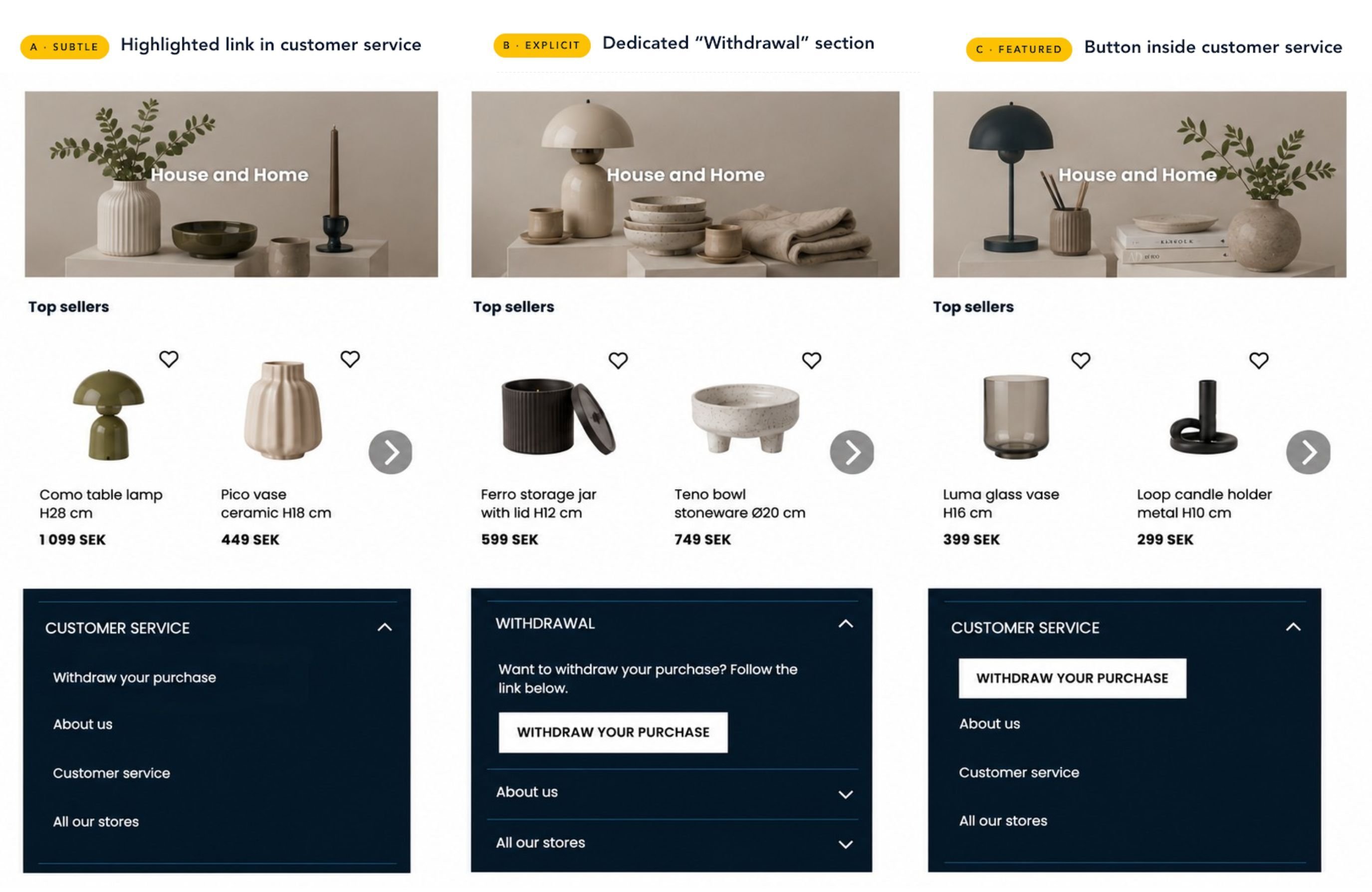
EU consumers have been able to cancel an online purchase within 14 days since 2011. However, from June 19, 2026, a new directive (2023/2673) enters into force, making a small button or a clear link a legal requirement on all e-commerce sites. The right to withdraw can no longer be buried in a company’s terms and conditions. Instead, it must be part of the customer experience. The withdrawal button or link needs to be visible, easy to find, work for both logged-in and non-logged-in users, and usable without requiring the customer to contact customer service.
Different From Returns
The most important difference to understand is that the right of withdrawal is not the same as your returns policy. Returns are a commercial process governed by your own policy. Withdrawal is a statutory legal right. They must not be mixed up, not in your internal processes, and not in how the customer experiences your site.
Checklist: Are You Prepared?
1. A clear entry point on your site
-
Add a link or button labeled "Withdraw from purchase" (or equivalent), visible across all pages (for example in your footer.)
-
The button/link must be accessible throughout the entire 14-day withdrawal period.
-
The button/link must not be labeled "Return," "Exchange," or "Get a refund" but instead clearly be about The Right of Withdrawal.
-
No login should be required to see or access the function.
2. A dedicated withdrawal page with a form
-
The page must allow the customer to enter their name/e-mail, order number, and the products they wish to withdraw.
-
The customer must be able to withdraw one, several, or all products in an order either by selecting the products via a visualization of their order or a simple free text area.
-
An optional text field, for example a comment, can be added if the customer wants to comment on their withdrawal. There must be a clear confirmation button ("Submit my withdrawal request" or similar.)
3. Confirmation and acknowledgment
-
The customer must immediately see a confirmation page.
-
An automatic personally addressed confirmation email must be sent at once.
-
The email must include information on the next steps, a return shipping label, or information about how this will be sent.
4. Logged-in customers
-
For logged in customers where you typically have an order history page or section on your site, it is recommended, for each order that falls within the 14-day window, to have a visible button to start a withdrawal.
-
The whole withdrawal process is either done here or linked to the page available for all customers.
5. Backend technology and processes
-
Your system needs to be able to confirm whether an order is within the permitted withdrawal window or not.
-
Order data needs to be accessible to your e-commerce platform and email provider (e.g. via OMS integration.)
-
Your customer service team needs a clear workflow for handling incoming withdrawal requests.
-
A return shipping label must be able to be created and sent to the customer.
Timing is Trickier Than it Looks
The law, as it is right now, counts 14 days from when the customer receives the order, not from the date of purchase. If an order includes multiple parcels, the clock starts after the last item has been delivered.
In practice, your system settings need to account for delivery time. Many retailers opt for a slightly more generous window (for example 20–30 days from order completion status) to safely cover variations in delivery time and collection points.
If you do not have a compliant function in place, the customer's withdrawal right automatically extends from 14 days to 12 months from delivery. That's a direct commercial risk on top of any potential fines. This will continue to be the case.
What Doesn't Count as Compliant?
There are certain common mistakes you will want to avoid. These include:
– Telling customers to email or call customer service as the only withdrawal route.
– A link labeled "Return item" as the sole path to exercising withdrawal rights.
– Retention pop-ups ("Are you sure? Here's 10% off!”) placed within the withdrawal flow. These are allowed after withdrawal is completed, never blocking the path to it.
– Forms that require the customer to log in.
– A withdrawal link/button only visible in the footer but not in the order history for logged-in customers.
.jpg?width=940&height=376&name=Telling%20customers%20to%20email%20or%20call%20customer%20service%20as%20the%20only%20route.%20(3).jpg)
What’s Good to Remember
While the new EU legislation is made for strengthening the customer’s rights online, it’s important to remember that the current law still stands.
This includes:
– Your customer has 14 days to withdraw (after receiving the products)
– Your customer can withdraw one, multiple, or all products.
– Your customer may be required to pay for the return, but should always be reimbursed for the delivery cost if the entire order has been withdrawn.
– A printed/printable withdrawal form should always be provided to your customer.
What’s also important to know is that shoppers do not have to give a reason to withdraw, neither now nor after the new directive comes into effect. The reason-for-withdrawal field must be optional and should never get in the way of completing the customer’s withdrawal process.